● personal project▸ 02AAug 2026
Phototriage
- role
- Design and development
- tools
- Rust
- egui
- eframe
- wgpu
- rawler
- rayon
The need
I shoot with an Olympus camera, in RAW. One outing means hundreds of 4608 × 3456 images, and Lightroom is slow for a first pass. I wanted a tool that goes through a folder as fast as a viewer, lets me decide from the keyboard, photo after photo, then compare the shots of a burst, crop, and check the composition, before opening Lightroom.
Triage without ever losing anything
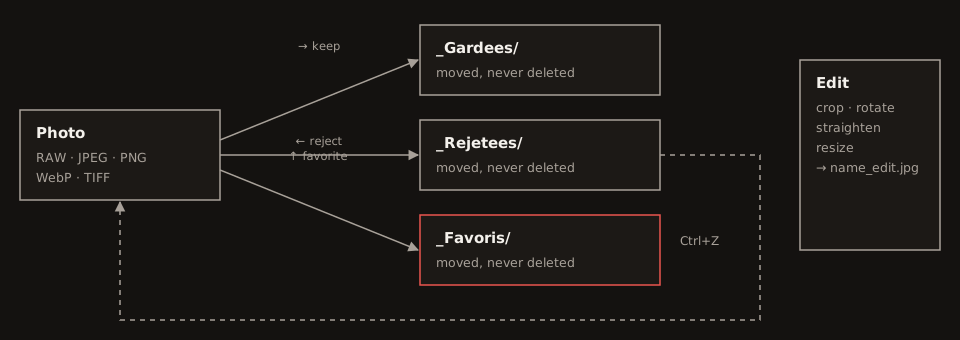
Triage works like a swipe: right arrow to keep, left to reject, up for favourites. Nothing is ever deleted: each photo is moved into a subfolder, and Ctrl+Z puts it back. Edits (crop, rotation, fine straightening, resizing) always write a new file next to the original.
Technical choices
Native Rust, with egui/eframe rendered on the GPU (wgpu): no embedded browser, an app that starts fast and keeps up with the keyboard. RAW files are decoded by rawler, a pure Rust library, to keep builds simple on Windows and Linux alike. A rayon thread pool decodes in the background and preloads in the reading direction, with an in-memory LRU cache bounded in bytes and an on-disk thumbnail cache.
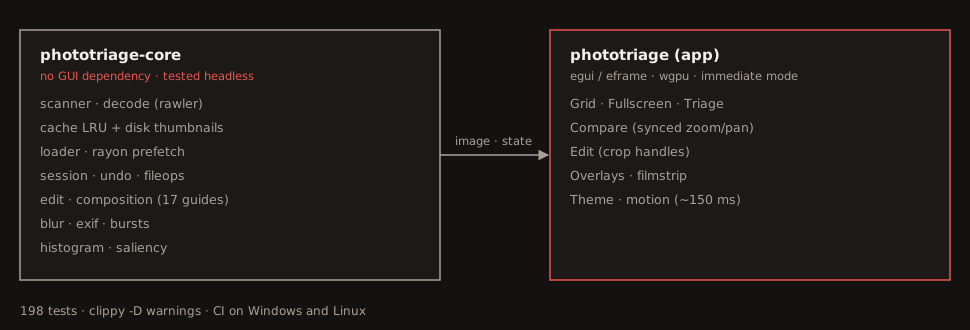
egui redraws everything every frame; mixing logic and display would have made undo and file moves impossible to test. So all the logic lives in a crate with no graphics dependency, covered by 198 tests, with Windows and Linux CI.
Seeing the composition
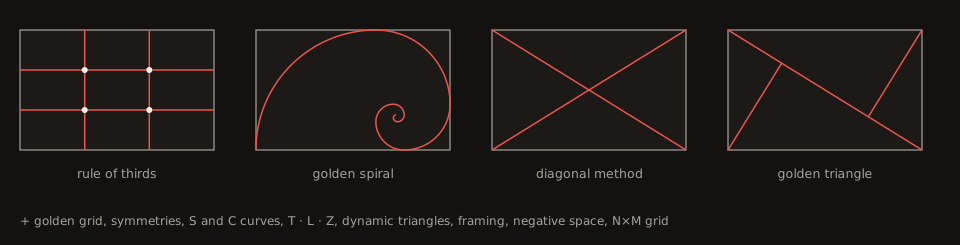
In fullscreen, 17 composition guides can be laid over the photo, each in its own colour: rule of thirds, golden grid and spiral, golden triangle, diagonals, symmetries, S and C curves, T, L and Z compositions, dynamic triangles, natural framing, negative space, plus a free grid. They rotate, flip, fade, and can even move outside the frame.
Helping to see
A last phase adds decision aids: blur detection (variance of the Laplacian), grouping bursts by capture time, a histogram and over-exposure zebras, filters by ISO, aperture, shutter speed and lens, and a thumbnail strip that works like a video timeline.
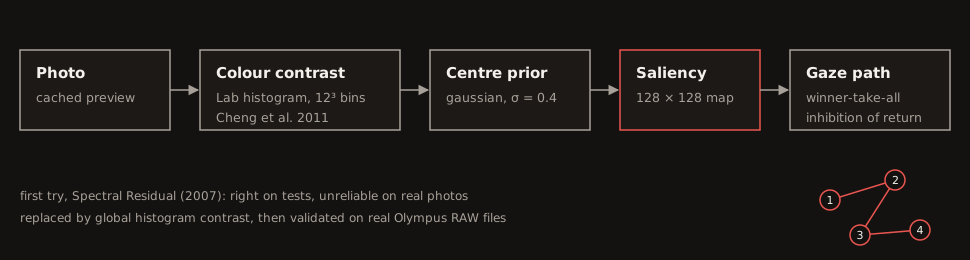
Then a saliency map: where the eye lands first. The first algorithm (Spectral Residual) passed every test, but went wrong on real photos. I replaced it with a global contrast over the colour histogram (Cheng et al., 2011), weighted towards the centre. A “first look” mode dims the rest of the image, and a gaze path numbers the points seen in order, by winner-take-all and inhibition of return.